
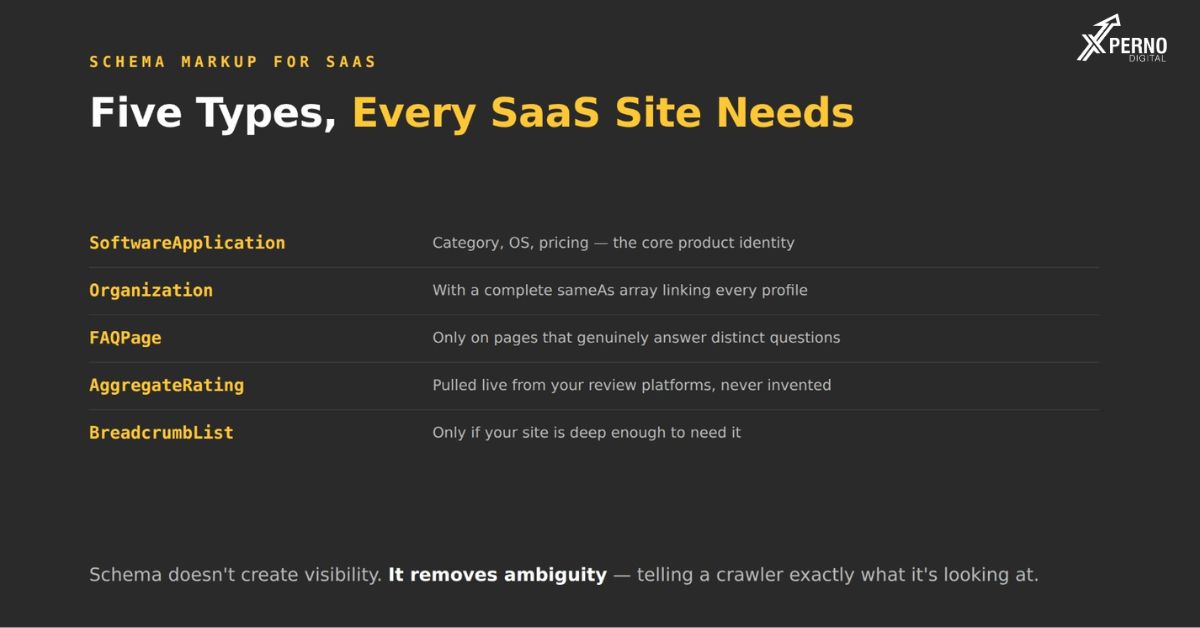
Four: Organization, SoftwareApplication, FAQPage and AggregateRating. Everything else is optional or cargo cult.
This post is the implementation detail where each one goes, what to include, and what breaks them. For the strategic view of what schema does and does not achieve, that sits in the schema overview.
One thing worth restating before the code: Schema does not create visibility. It removes ambiguity about your facts, which reduces the chance of being described incorrectly or skipped because a model could not parse your page. Treat it as half a day of hygiene, once, not as a lever.
Organization: site-wide:
Establishes your brand as an entity and connects your presences to each other.
Json
“@context”: “https://schema.org”,
“@type”: “Organization”,
“name”: “Your Company”,
“legalName”: “Your Company Pvt Ltd”,
“url”: “https://yourcompany.com”,
“logo”: “https://yourcompany.com/logo.png”,
“description”: “Field service scheduling software for HVAC and plumbing contractors with 10–200 field technicians.”,
“foundingDate”: “2019”,
“email”: “[email protected]”,
“address”: {
“@type”: “Postal Address”,
“address Locality”: “Indore”,
“address Region”: “Madhya Pradesh”,
“address Country”: “IN”
“same As”:
“https://linkedin.com/company/your company”,
“https://x.com/your company”,
“https://crunchbase.com/organization/your company”,
“https://g2.com/products/your company/reviews”,
“https://github.com/your company”
The two fields that matter most:
sameAs`: The most commonly omitted and the most useful. It declares explicitly that these profiles all refer to one entity, rather than leaving the connection to inference. List every profile you control.
Description: This should be your canonical description, used verbatim everywhere else. Category, function and target customer in one sentence.
Where it goes?: Site-wide, in the head or footer template.
Software Application : Product and pricing pages
The type most SaaS sites skip, and the one that describes what you actually sell.
Json
{
“@context”: “https://schema.org”,
“@type”: “Software Application”,
“name”: “Your Product”,
“application Category”: “Business Application”,
“application Sub Category”: “Field Service Management”,
“operatingSystem”: “Web, iOS, Android”,
“description”: “Scheduling, dispatch and invoicing for field service teams of 10–200 technicians.”,
“url”: “https://yourcompany.com/product”,
“softwareVersion”: “4.2”,
“offers”: {
“@type”: “Offer”,
“price”: “49.00”,
“priceCurrency”: “USD”,
“priceValidUntil”: “2027-12-31”,
“availability”: “https://schema.org/InStock”,
“priceSpecification”: {
“@type”: “UnitPriceSpecification”,
“price”: “49.00”,
“priceCurrency”: “USD”,
“unit Text”: “per user per month”,
“min Price”: “49.00”
“feature List”: [
“Job scheduling and dispatch”,
“Mobile technician app with offline mode”,
“Invoicing and payment collection”,
“QuickBooks and Xero integration”
“aggregate Rating”:
“@type”: “Aggregate Rating”,
“rating Value”: “4.6”,
“review Count”: “127”,
“best Rating”: “5”
On `application Category`: Use a value from Schema.org’s list `Business Application` covers most B2B SaaS. Put your real category in `application Sub Category`, which accepts free text.
On pricing when yours is custom: Do not omit the `offers` block. Use `minPrice` with a `PriceSpecification`, or state a starting figure. Omitting pricing entirely means no extractable price fact exists about your product anywhere, which removes you from every query comparing options on cost.
On `featureList`: Four to eight specific capabilities. Not marketing phrases things a buyer could verify.
FAQ Page: where you genuinely answer questions
json
“@context”: “https://schema.org”,
“@type”: “FAQPage”,
“mainEntity”:
“@type”: “Question”,
“name”: “How long does implementation take?”,
“acceptedAnswer”: {
“@type”: “Answer”,
“text”: “Implementation takes four to six weeks for teams under 50 users, and eight to twelve weeks for larger deployments requiring custom integrations.”
“@type”: “Question”,
“name”: “Does it work offline?”,
“acceptedAnswer”: {
“@type”: “Answer”,
“text”: “The mobile app supports offline job viewing and time logging. Editing and photo upload require connectivity and sync when reconnected.”
Three rules:
The answer text must match your visible content: Divergence between markup and page content is a policy violation and can result in all your structured data being ignored.
Only on pages that genuinely answer questions: Adding FAQ Page to a page with no FAQ section is the kind of thing that gets markup disregarded site-wide.
It pairs with answer-first writing: If your page already has question-based headings answered completely in the first sentence, this markup is close to free you are declaring in structured form what the page already says.
Aggregate Rating: only with real reviews:
Usually nested inside SoftwareApplication rather than standalone, as shown above.
Do not fabricate these. It is detectable, it is a clear policy violation, and the consequence is losing rich result eligibility entirely which costs more than the markup ever gained.
Where the numbers should come from: Your actual review data. If you have 127 reviews averaging 4.6 on G2, use that and be prepared to show the source.
If you have no reviews: Omit the block. An absent rating is neutral; an invented one is a liability.
What breaks structured data?
Five mistakes that cause markup to be ignored or penalised:
1. Schema injected by JavaScript: If your markup is added client-side, crawlers that do not execute scripts never see it. Check your raw page source not the rendered DOM in devtools for `application/ld+json`. This is common and it silently nullifies the whole implementation.
2. Markup contradicting visible content: FAQ answers in schema that differ from the page. Prices in markup that differ from the pricing page. Both are policy violations.
3. Fabricated ratings: Covered above.
4. Wrong type for the page: `Article` schema on a product page. Type mismatches create ambiguity rather than removing it, which is the opposite of the point.
5. Duplicate or conflicting entities: Two Organization blocks with different descriptions, or SoftwareApplication on every page with inconsistent details. Declare each entity once, consistently.
How do you validate it?
Three checks, five minutes:
Google Rich Results Test: Checks eligibility and syntax for Google specifically.
Schema.org Validator: Checks structural validity against the specification, independent of Google.
View source and search for `application/ld+json`: Confirms the markup is in the served HTML rather than injected later. The check most people skip and the one that catches the most consequential failure.
Run all three: The first two can pass on markup that a crawler never sees, because the testing tools render JavaScript.
What to skip?
Six types commonly implemented on SaaS sites that do little:
Type /Why skip
- `Speakable: Voice assistant support is minimal; no citation effect
- `Breadcrumb List` on shallow sites Useful on deep hierarchies, not on a 20-page site
- `How To` Google deprecated the rich result; benefit has narrowed
- `Person` for every team member Occasionally useful for genuine subject-matter authority, usually not
- `Web Site` with Search Action Sitelinks search box was deprecated
- Nested markup on every page More schema is not better. Four types correctly beats fourteen partially
The general rule: If you cannot state what a piece of markup is disambiguating, do not implement it. Schema exists to remove uncertainty about facts. Markup that declares nothing factual adds nothing.
What order should you implement?
Organization first, Software Application second, FAQ Page where applicable, Aggregate Rating if you have reviews.
Order | Type | Where | Time
- Organization with full `sameAs` Site-wide 45 min
- Software Application with `offers: Product, pricing 1 hr
- FAQ Page: Pages with real FAQ sections 30 min each
- Aggregate Rating: Nested in Software Application 10 min
About half a day total.Then validate, confirm it is in the raw source, and stop.
Platform notes: WordPress handles Organization and FAQ Page through Yoast or Rank Math; Software Application usually needs a custom block. Webflow and HubSpot take it in custom code fields. Custom builds should render it server-side.
Frequently Asked Questions:
Does schema markup improve AI citation?
Not directly. It removes ambiguity about your facts, which reduces the chance of being described incorrectly or omitted because a model could not parse your page
What if my pricing is custom?
Use `minPrice` in a `PriceSpecification`, or state a starting figure. Omitting pricing entirely leaves no extractable price fact about your product anywhere.
Can I use Product schema instead of SoftwareApplication?
SoftwareApplication is more specific and includes relevant properties like `operatingSystem` and `applicationCategory`. Use it for software.
Will invalid schema hurt my rankings?
Invalid markup is generally ignored rather than penalised. Markup contradicting your visible content, or fabricated ratings, can result in structured data being disregarded and rich result eligibility being lost.
Do I need schema on every page?
No. Organization site-wide, SoftwareApplication on product and pricing pages, FAQPage where you genuinely answer questions.
Why is my valid schema not being picked up?
Most commonly because it is injected by JavaScript. Check your raw page source, not the rendered DOM testing tools execute scripts and will show a false pass.