
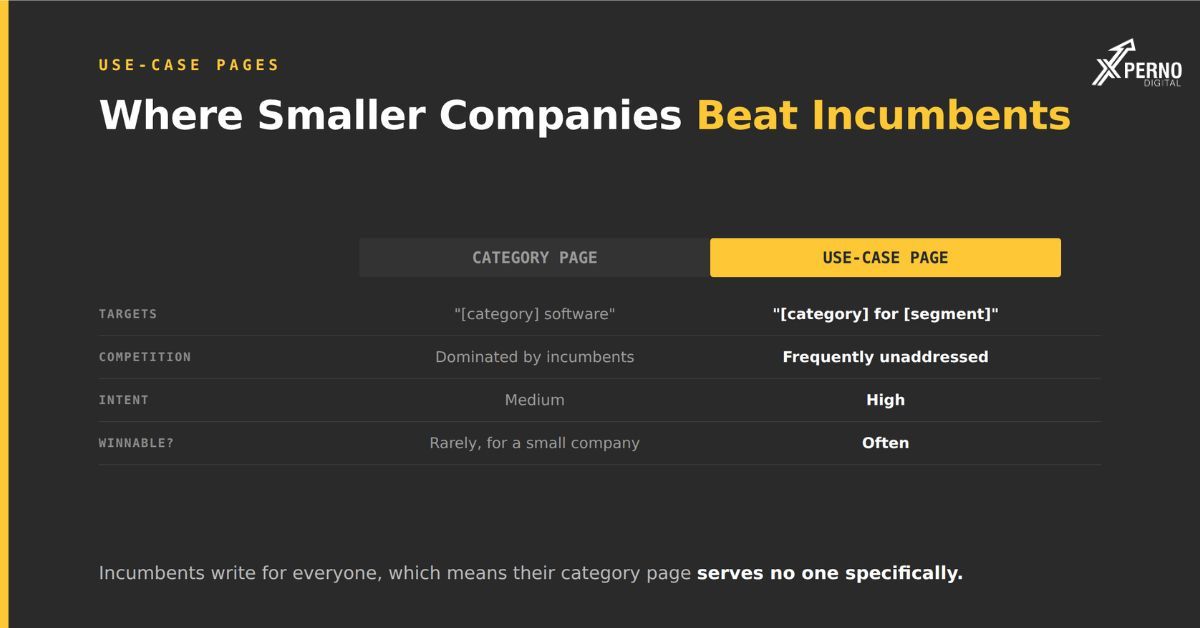
A use-case page addresses your product in the context of one specific situation an industry, a company size, a job to be done rather than describing the product in general.
Not “project management software” but “project management for architecture firms.” Not “our CRM” but “CRM for field service teams with under 50 technicians.”
Why they matter disproportionately for smaller companies: Incumbents write for everyone. Their category page has to serve a twelve-person startup and a two-thousand-person enterprise simultaneously, which means it serves neither specifically. The buyer with a narrow situation finds a page that does not describe their situation.
That gap is where a smaller vendor wins in search and in AI answers, for the same underlying reason. A query about a specific situation needs a source that addresses that situation.
Which use cases should you build pages for?
Build pages for the segments that already appear in your customer base and your sales pipeline, not the ones you aspire to.
The Method:
Step 1: Segment your existing customers: By industry, by size, by primary job. Which three to five groups account for most of your revenue?
Step 2: Check your pipeline: Which segments convert fastest and churn least?
Step 3: Listen to sales calls.: How do prospects in each segment describe their situation? Those phrasings are your page titles.
Step 4: Check whether anyone has addressed it: Search the query. If the results are generic category pages from large vendors, that is an opening.
How many? Four to eight for most companies. Enough to cover your real segments, few enough to keep current and substantive.
The failure mode to avoid: Generating forty use-case pages programmatically by swapping an industry name in a template. Search engines and AI systems both handle near-duplicate content poorly, and a page that says nothing specific about architecture firms will not be cited for architecture firm queries. If you cannot say something genuinely different about a segment, do not build a page for it.
What Structure Works?
Seven sections, each answering a question the buyer in that segment actually has:
1. Direct answer:
Open by stating who this is for and what it does for them. No preamble.
[Product] gives architecture firms of 5–50 people a single system for project timelines, drawing revisions and client approvals. It replaces the combination of spreadsheets, email threads and shared drives most practices use. Firms typically go live in three weeks and connect it to their existing CAD and accounting tools.
Specific segment, specific problem, specific facts. This is the section most likely to be extracted.
2. The problem, in their language:
Describe the situation as someone in that segment would. Use the vocabulary from your sales calls, not your internal terminology.
An architecture firm does not have a “resource allocation challenge.” They have “three projects hitting drawing sets in the same week and no way to see who is free.”
3. What is different about this segment:
The section that justifies the page existing. What is genuinely specific about serving this group?
Regulatory requirements. Workflow differences. Integrations they specifically need. Team structures. Seasonality. Terminology.
If you cannot fill this section with something real, delete the page. That is the test for whether the use case warranted a dedicated page at al
4. How your product handles it:
Features, but framed as answers to that segment’s problems rather than as a feature list. Two to four capabilities, each tied to something from section 2.
5. What it costs for this segment:
Typical configuration and price for a company of this type. Not a link to the pricing page the actual figure or range.
This is one of the most extracted sections and one of the most commonly omitted.
6. What it does not do for this segment:
The section almost nobody includes, and the one that makes everything else credible.
[Product] does not handle detailed CAD file version control. Firms needing that typically run it alongside [category of tool]. If drawing version control is your primary problem rather than project coordination, this is not the right fit.
Two things this achieves: It filters out poor-fit prospects before they consume sales time. And it makes the rest of the page believable a page with no stated limitation reads as marketing.
7. FAQ:
The specific questions this segment asks. Pulled from sales calls, not invented. Add FAQPage schema.
What is the difference between a category page and a use-case page?
A category page describes your product for everyone; a use-case page describes it for one specific situation. Both are needed, and they target different queries.
- Category page: Use-case page
- Target: “[category] software” “[category] for [segment]”
- Audience: Anyone in the market One specific buyer type.
- Volume: Higher Lower.
- Intent: Medium High.
- Competition: Dominated by incumbents Frequently unaddressed.
- Winnable for a small company: Rarely Often.
A note on category pages: You need one it is your primary product page and it anchors the cluster. But it is not where you should expect to compete for rankings if you are smaller than the market leaders. Treat it as a hub that links to the use-case pages doing the actual work.
How do these perform in AI search?
Use-case pages are cited disproportionately for situational queries, because AI prompts tend to be more specific than search queries.
People type fragments into Google and describe their situation to an AI. “project management architecture” becomes “we’re a 15-person architecture practice, everything’s in spreadsheets and it’s falling apart, what should we use.”
That prompt needs a source addressing a 15-person architecture practice. A generic category page cannot answer it well. A use-case page can answer it exactly.
This is a genuine structural advantage for smaller companies , and it is larger in AI search than in traditional search because the queries themselves are more specific.
One practical addition: When you build a use-case page, write down the conversational version of the query it targets and add it to your monthly prompt testing. That is how you find out whether the page is working.
How do you avoid building thin pages?
Apply the substitution test to every page before building it: could a competitor publish this page with their logo on it?
If the only thing distinguishing your architecture-firm page from your law-firm page is the word “architecture,” you have built a template rather than a page, and neither will be cited.
Three checks before committing to a page:
Can you fill section 3? Something genuinely specific about serving this segment. If not, do not build it.
Do you have at least three customers in this segment? Without them you are guessing at the problems, and it will read as guessing.
Can you state a price for this configuration? If the segment does not have a typical configuration, it may not be a coherent segment.
When the answer is no: Fold the segment into a broader page rather than giving it a thin one of its own. Three substantial pages outperform twelve templated ones, for both search and citation.
How do you maintain them?
Review annually, and immediately whenever pricing, integrations or capabilities change for that segment.
These pages contain specific facts prices, timelines, integration names. They decay.
A simple discipline: A visible “last reviewed” date, an annual calendar reminder, and a rule that anyone changing pricing or sunsetting a feature checks which use-case pages mention it.
An outdated use-case page is worse than none, because the specificity that made it valuable is now specific misinformation.
Frequently Asked Questions:
How many use-case pages should a SaaS company have?
Four to eight for most companies. Enough to cover your real revenue segments, few enough to keep substantive and current.
Can I generate use-case pages programmatically?
Only if each has genuinely different content. Swapping an industry name in a template produces near-duplicate pages that neither rank nor get cited.
Should use-case pages be in the main navigation?
Usually under a “Solutions” or “Who it’s for” menu. They also need internal links from your category page and from related content.
What if my product serves everyone equally?
Then you probably do not need use-case pages but check that assumption against your customer data. Most products that claim universal fit have three segments producing most of the revenue.
Do use-case pages cannibalise my category page?
No, if they target genuinely different queries. Cannibalisation happens when two pages target the same query, not when one is narrower.
How long should a use-case page be?
800–1,400 words. Long enough to say something specific about the segment, short enough that the specifics are not buried.