
Architecture affects discoverability and topical clarity whether pages are found at all, and whether a group of pages reads as coherent coverage of a subject. It does not directly determine whether a specific claim gets cited.
Worth setting the ceiling honestly. Restructuring a site with nothing extractable on it will not produce citations. What good architecture does is make sure the pages that do contain usable claims can be found, and that the relationships between them are legible.
Three things it genuinely affects:
Discoverability: A page nobody links to and nothing points at may not be crawled or may be crawled rarely.
Topical clarity: A cluster of related pages, properly linked, reads as coverage of a subject. The same pages scattered with no relationships read as unrelated content.
Crawl efficiency: On larger sites, crawlers spend finite attention. Poor structure spends it on low-value pages.
What actually matters?
Five things, ranked by effect:
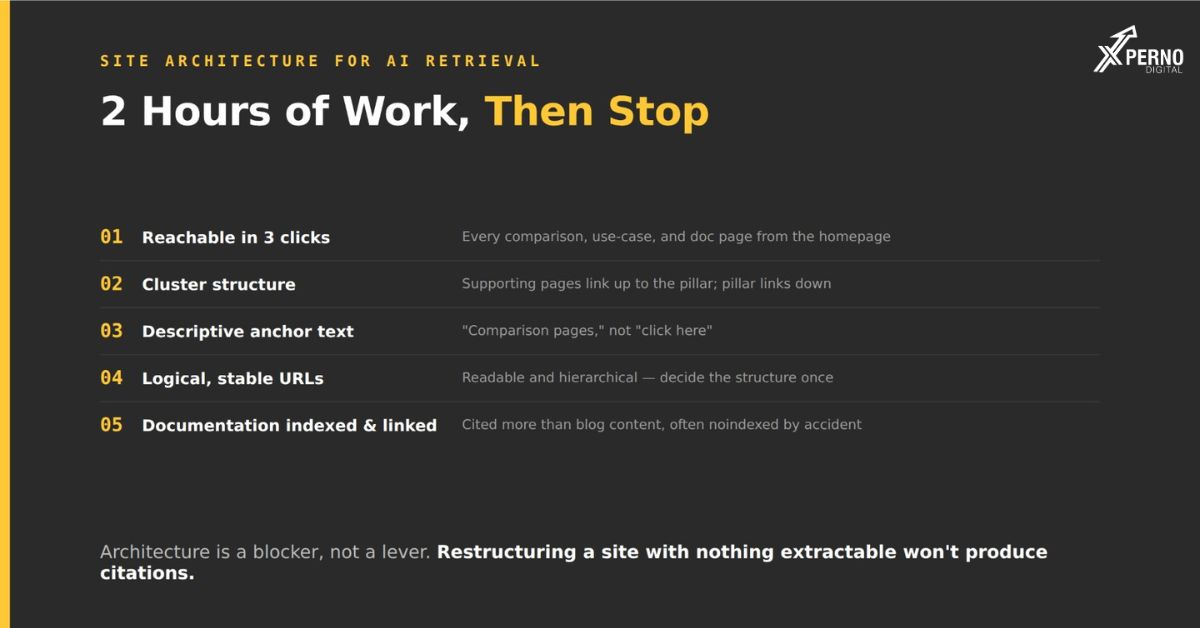
1. Every important page is reachable in three clicks:
If a page requires four or five clicks from the homepage, it is crawled less often and treated as less important.
The check: From your homepage, can you reach every comparison page, use-case page and key documentation page within three clicks? If not, they need better linking.
The common failure: Comparison pages published, never linked from anywhere, discoverable only via the sitemap. They exist and nothing points at them.
2. Cluster structure with real internal links ;
Related pages linked to each other and up to a hub page is what makes a topic read as covered rather than as scattered.
The pattern:
A pillar page covering the subject broadly
Supporting pages covering sub-topics in depth
Every supporting page links up to the pillar within the first 200 words
The pillar links down to every supporting page
Related supporting pages link sideways to each other
Why it matters for retrieval?: When a model assembles an answer, corroborating pages on the same domain that reference each other are easier to relate. Isolated pages provide no context about what else you have covered.
The most common gap: The pillar links down but supporting pages never link back up, so the cluster is one-directional and reads as weaker than it is.
3. Descriptive anchor text:
“Comparison pages” tells a crawler what the destination contains. “Click here” and “this article” tell it nothing.
Cheap to fix, applies to every link you write, and it is one of the few signals about a page that comes from outside the page
4. Logical, stable URLs:
Good:
\/compare/yourproduct-vs-competitor
/integrations/quickbooks
/for/architecture-firms
Poor:
/page?id=4472
/blog/2024/03/post-title-here-final-v2
/solutions/enterprise-grade-workflow-optimization.
What matters?: Readable, hierarchical, and stable. What does not: keyword stuffing in the slug, or exact-match URLs for their own sake.
Stability matters most. Every URL change is a redirect, and redirect chains accumulate into a real crawl cost. Decide the structure once.
5. Documentation is indexable and linked:
Documentation is cited more often than blog content, because it contains checkable facts rather than persuasion. It is also frequently noindexed by accident during a subdomain setup.
Two checks:
site:docs.yourdomain.com` in Google if nothing returns, it is invisible
Your docs subdomain has its own `robots.txt`, separate from your main domain
And link to it. Documentation isolated on a subdomain with no inbound links from the marketing site is harder to discover than it should be.
Subdomain or subfolder?
Subfolders are generally preferable, and the difference matters less than it used to.
- Subfolder Subdomain
- `docs.yourdomain.com` / ✓
- `yourdomain.com/docs` /✓
- Authority sharing Full / Partial
- Setup complexity Higher / Lower
- Separate robots.txt No / Yes a common failure point
The practical view: Subfolders share authority more cleanly and avoid the separate-robots.txt problem, which is a genuine and common cause of invisible documentation.
But do not migrate a working subdomain just for this. Migrations carry risk, and the benefit is modest. If your docs are already on a subdomain and indexed properly, leave them and make sure they are well linked.
Where it does matter?: if you are deciding now, choose a subfolder.
What is cosmetic?
Four things that get architecture attention and do not deserve much:
Breadcrumb schema on a shallow site: Useful on large sites with deep hierarchies. On a twenty-page marketing site it does nothing.
Elaborate URL keyword optimisation: Readable and stable matters. Cramming target terms into slugs does not.
Perfect click-depth across the entire site: Get your important pages within three clicks. Optimising depth for your entire archive is effort with a poor return.
Mega-menus for SEO purposes: Linking to sixty pages from every page dilutes rather than concentrates. Link to what matters.
How does this differ from traditional SEO architecture?
The principles are the same. Two things carry more weight for retrieval than they did for ranking alone.
Cluster coherence matters more:
Retrieval favours sources that corroborate each other. A tightly linked cluster where pages reference one another provides more context than the same pages scattered.
Documentation matters more:
For ranking, documentation was often an afterthought. For citation it outperforms blog content, which makes its indexability and linking a higher priority than it used to be.
Everything else is the same discipline: Reachable pages, logical hierarchy, descriptive links, stable URLs.
What should you actually do?
Four checks, about two hours, and then stop:
1. Click-depth audit (30 min): From the homepage, reach every comparison page, use-case page, integration page and pricing page. If any takes more than three clicks, add links.
2. Cluster linking (45 min): For each cluster: does every supporting page link up to the pillar in its opening? Does the pillar link down to all of them? Add what is missing.
3. Documentation check (15 min): `site:docs.yourdomain.com`. Check the docs subdomain’s own robots.txt. Add links from the marketing site.
4. Anchor text pass (30 min): Find “click here,” “this article,” “learn more” on your key pages and replace with descriptive text.
Then stop: Architecture is a blocker rather than a lever. Once important pages are reachable, clusters are linked and documentation is visible, further structural work has sharply diminishing returns and the constraint moves to content type and off-site presence.
Frequently Asked Questions:
Does URL structure affect AI citation?
Only through discoverability. Readable, stable URLs help; keyword-stuffed slugs do not?
Should documentation be on a subdomain or subfolder?
Subfolder if you are deciding now. If it is already on a working, indexed subdomain, leave it migration risk outweighs the benefit.
How deep can a page be before it matters?
Get important pages within three clicks of the homepage. Beyond that, crawl frequency drops and the page is treated as less significant.
Do I need breadcrumb schema?
Useful on large sites with deep hierarchies. On a small marketing site it adds nothing.
How many internal links should a page have?
Enough to connect it to its cluster typically three to eight relevant links. Linking to sixty pages from every page dilutes rather than concentrates.
Will restructuring my site improve AI visibility?
Only if structure was the blocker. If your pages contain nothing extractable, restructuring will not help.