
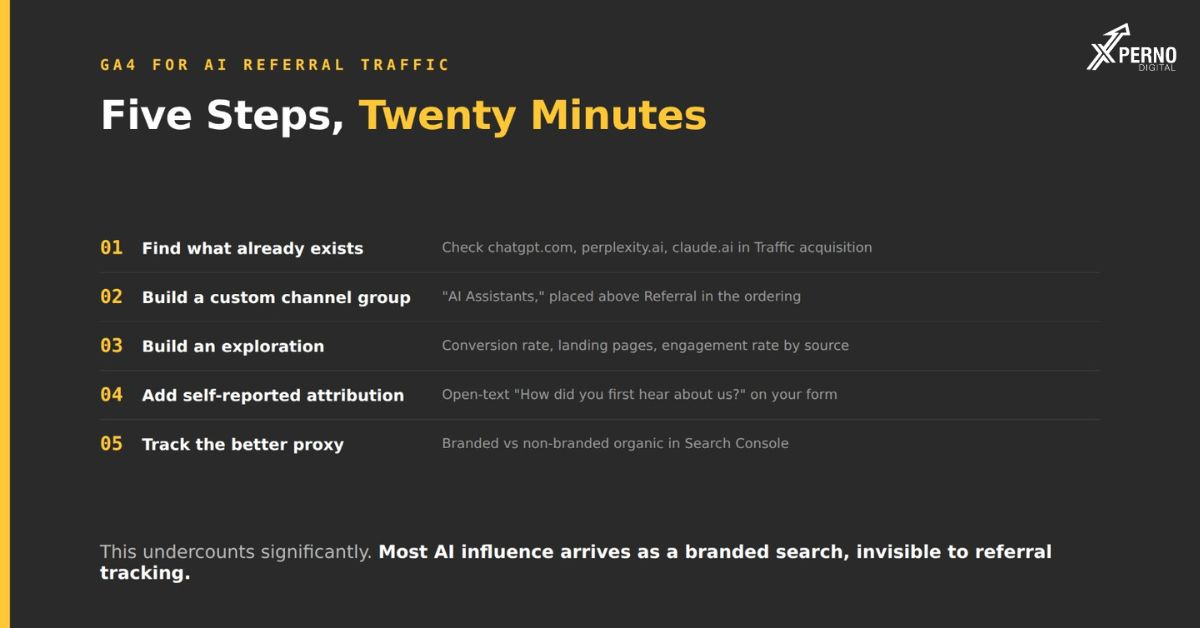
Yes, partially. GA4 records sessions referred from AI platforms, but this undercounts AI influence substantially because most AI-influenced visits arrive as branded search rather than as referrals.
Set up anyway. It takes twenty minutes, it gives you a floor, and the conversion rate on that traffic is genuinely informative.
What you will be able to see?: Sessions, conversion rate and behaviour for visitors who clicked a link inside an AI interface.
What you will not see? : the buyer who read a recommendation, opened a new tab, searched your brand name and arrived via Google. That is the majority of AI influence and it is invisible to referral tracking.
Step 1: Find the traffic that already exists:
Before configuring anything, check whether you have any.
Reports → Acquisition → Traffic acquisition, then change the dimension to Session source / medium.
Search for each of these:
- chatgpt.com
- perplexity.ai
- gemini.google.com
- copilot.microsoft.com
- claude.ai
- you.com
- bing.com (Copilot links sometimes route through Bing)
What you will typically find?: Small numbers. A low single-digit percentage of total sessions is normal for B2B.
What to look at first?: The conversion rate, not the volume. AI referral sessions frequently convert at several times your site average, because the visitor arrived having been recommended rather than having browsed.
Step 2: Build a custom channel group:
This makes AI traffic appear as its own channel alongside Organic, Paid and Direct, rather than being buried in Referral.
Admin → Data display → Channel groups → Create new channel group
Name it something like `Default + AI`.
Add a new channel called `AI Assistants`, and place it above Referral in the ordering channel groups evaluate top-down, so if Referral comes first it will capture the traffic before your rule sees it.
The condition:
Source matches regex:
chatgpt\.com|perplexity\.ai|gemini\.google\.com|copilot\.microsoft\.com|claude\.ai|you\.com|openai\.com|anthropic\.com
Save. The new grouping applies to data going forward and, in most cases, retroactively to historical data in reports using that channel group.
Two things that catch people. New channel groups do not appear in every report immediately. And the default channel group cannot be edited you have to create a new one and select it in the reports where you want it.
Step 3: Build an exploration:
For anything more detailed than the standard reports:
- Explore → Blank
- Setting Value
- Dimensions Session source, Session medium, Landing page, Device category
- Metrics Sessions, Engagement rate, Conversions, Session conversion rate
- Filter Session source · matches regex (the regex above)
What to look at?
Conversion rate against your site average. This is the number that justifies attention.
Landing pages: Which pages AI engines are actually sending people to. Frequently these are not the pages you expected, and they tell you which content is being cited.
Engagement rate: Whether these visitors behave differently. They usually spend less time, because they arrived with more prior context.
Step 4: Add self-reported attribution
The single most useful thing in this post, and it is not a GA4 setting.
Add one optional field to your demo or contact form:
How did you first hear about us?
(open text)
Why open text rather than a dropdown?: A dropdown forces people into your existing categories and misses new behaviour. Open text surfaces “ChatGPT recommended you” and “asked Perplexity for alternatives to X” answers no preset option would have contained.
How to use it?: Review responses monthly and count how many mention an AI tool. Compare that proportion against your GA4 AI referral share.
The gap between those two numbers is the size of your measurement problem. If 15% of form responses mention an AI tool while GA4 shows 2% AI referral traffic, you now have a rough sense of how much is invisible.
The caveat: Self-reported attribution is unreliable in aggregate people misremember. The trend over months is more informative than any single month.
Step 5:Track the better proxy:
Branded versus non-branded organic, in Search Console.
This is a stronger signal than referral data because it captures the detour that referral tracking misses.
In Search Console → Performance → Search results:
1. Add a query filter, set to excludes your brand name and common variants
2. Note the trend over twelve months
3. Reverse the filter to containsand compare
How to read it:
- Pattern Likely meaning
- Branded rising, non-branded flat People are learning your name elsewhere and then searching it
- Both falling Ranking loss or declining category interest
- Branded flat, non-branded falling New discovery is declining
The first pattern is the signature of AI-mediated discovery.
What this setup will not tell you
Four limitations worth stating rather than discovering later.
It undercounts significantly: The brand-search detour is the majority of AI influence and it is invisible here.
AI Overviews clicks are indistinguishable from Google organic: They originate on a Google results page and record as such. There is no separate dimension in GA4 or Search Console.
Referrer data is inconsistent: Not every engine passes it reliably, and in-app browsers and privacy settings strip it in a meaningful share of sessions.
It tells you nothing about visibility: You could be cited by every engine and see almost no referral traffic, because being named produces branded search rather than clicks.
Which is the argument for measuring visibility separately share of voice across a fixed prompt set, run monthly. That is directly measurable today and it does not depend on anyone clicking anything.
What to report?
Report AI visibility and AI referral traffic as two separate things, because they measure different things.
Visibility: Share of voice and appearance rate from prompt testing. This is your position in the channel.
Referral traffic: Sessions and conversion rate from GA4. This is the visible fraction of the effect.
What not to do?: Present referral traffic as a measure of AI visibility. It will make a working channel look negligible, and that leads to underinvesting in it.
A reasonable framing for a report:
AI referral sessions: 47 this month (up from 31), converting at 6.8% against a site average of 1.9%. This represents a floor most AI influence arrives as branded search. Share of voice across our 20-prompt set is the primary visibility measure.
That states the number, states the limitation, and points at the metric that actually reflects position.
Frequently Asked Questions:
Why is my AI referral traffic so low?
Because most AI-influenced visits arrive as branded search. The buyer reads a recommendation and then searches your name, which records as organic.
Can I track Google AI Overviews clicks?
No. They originate on a Google results page and are recorded as normal Google organic. No separate dimension exists.
Should I use UTM parameters?
You cannot add them to AI citations, since you do not control the link. They remain useful everywhere
Does AI referral traffic convert better?
Usually, because the visitor arrived having been recommended. Check your own conversion rate by source that is better evidence than any general claim.
How often should I check this?
Monthly, alongside your prompt testing. The volume is small enough that weekly checks produce noise.
What if I see no AI referral traffic at all?
Either you are not being cited, or the volume is too small to register. Run your prompt set to find out which the visibility check answers a question the traffic data cannot.